← The Wingmakers Ways · not in the site's own index
Archived page · Asserted
Planetary Data File
Planetary_Data_File.html · captured from wingmakers.co.nz
Introduction
The interstellar galaxy cards are a system of cards used in this site for interstellar travel they also a link us to the grand porthole network system of the prime creators and are a reference system to where a galaxy or planetary system is and how far away that system is, we can also view the status of a galaxy or planetary system and you will find these cards throughout the constellation section of this site.
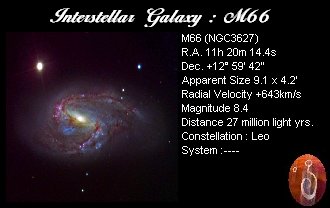
Interstellar Galaxy Card
Visual Exercise
STEP ONE
Select the interstellar galaxy above for this exercise but you can use the other cards after this exercise.
STEP TWO
Now i want you to focus your attention on the card and in your own time close your eyes and visualize the image of this card with your minds eye.
STEP THREE
Now i want you to prepare you visual body (astral body) for interstellar Travel using interstellar protection shield.
STEP FOUR
Then i want you to fill your right hand with prana energy and hold it there for a moment and in your spread that prana energy over the front of the card so that it is even. This card is a visual repression of the real galaxy or planetary system and as we would all known by now we can open doorways and portholes into aver dimensions and time periods and now we can open portholes in interstellar space as well. Because prana energy links us all with the living because prana energy is the energy of life its self.
STEP FIVE
Now i want you to select an destination point somewhere in that galaxy card that you are visualizing.
STEP SIX
Then in your own time see your visual body teleporting into the new destination of the M90 galaxy in the virgo constellation.
STEP SEVEN
Once you have arrived at your new destination perform the interstellar energy rapid to see if there are any planets or moons in that galaxy if you do detect a planet or moon teleport your visual body to that destination and use the mapping techniques and planetary data file system to record the data on that planet or moon then move on to the next planet or moon and record its data on a planetary data file and once you have mapped the new planetary system teleport your visual body back to the point in front of your physical body and open your eyes.
STEP EIGHT
Then i want you to close your eyes again and focus your attention on the planetary data files you have made in your travels and record them all on the planetary data filling system you can do this by taking the planetary data file into word and place text boxes into the blank sections on the planetary data file.
Then save your planetary data files in a file and remember well done .
The New Interstellar Galaxy Card
The new interstellar galaxy card is designed to make interstellar travel quicker and easyer the way this is done by teleport your visual body through the card and the symbol on the left hand side of the card is the sign of universal life force energy or as it is known the grand porthole network.
Save This Symbol and add it to your interstellar cards if you wish
And remember good luck with your travels and have fun ok
The New Interstellar Planetary Cards
Interstellar Planetary Cards are destinations confirmed by NASA and other Space research Centres Around the world and there are around 105 new destination for you to explore happy hunting and good luck. Most Of the Planetary Cards in this site will start with a HD: 80606 Number and you can find these cards in the constellation part of the site
Planetary Data Files
Introduction
We use planetary data files with interstellar travel to record all of the planetary information that we have gathered while visiting a planet or moon in a galaxy, Solar or star system, and planetary nebula because of their detail file system. When we have finished the planetary data file we can place it with an image of the planet or moon that we have visited so in the future we have all the planetary data on that galaxy, solar or star system, or planetary nebula.
Planetary Data File
STEP ONE
Enter your destination settings like i have in the image above. Start with your planetary system this can be a galaxy, star or solar system or a planetary nebula for this exercise lets use the mistori planetary system.
STEP TWO
Then enter your planetary destination which for this exercise is Vulcan.
STEP THREE
Then enter you star date which for this exercise is 16 August 1996.
STEP FOUR
Once you have gathered all the atmospheric planetary data enter it under the section titled Atmospheric Composition on the planetary data file to do this paste the planetary data file on a word page and open a text box in the blank space provided
then place all your atmospheric data in the text box then remove the background and line from around the text box then that section is finished. just like the image below.
STEP FIVE
Once you have looked around the planets or moons surface note down all your finds on the planetary data file just like the image below and make sure you list whether there is or isn't any of the listings below.
STEP SIX
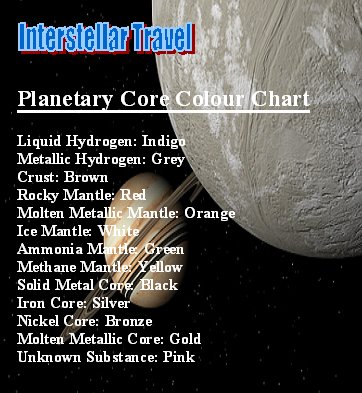
Then once you have performed the core comparison technique on the planets or moons core make a note of the reading for the surface or crust and the inner layers of the planetary core. a list of all the readings and colours can be found at the bottom of this page.
STEP SEVEN
Now the next question is, Is there any life forms on the surface of the planet or moon you can answer this question with a yes or no answer or you can give more detail it is up to you.
STEP EIGHT
Then we come to the report section of the planetary data file this can consist of any thing you wish to write about or any thing such as writing's that you may have seen on that planet or moon just like the writing sample on the report below a sample from the planet vulcan in the mistori planetary system.
STEP NINE
Then we take our planetary data file when it is finished paste it on the page titled mistori planetary system. The data file should look similar to the one below.
Vulcan Planetary Data File
Vulcan in the Mistori Planetary System
PLANETARY DATA FILE 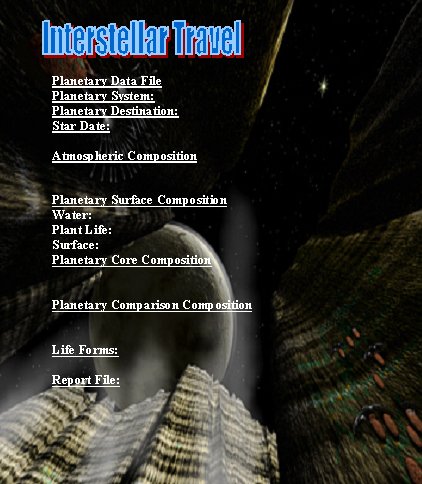
ATMOSPHERIC COLOUR CHART 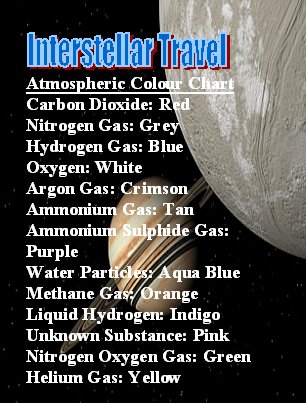 For more information look at the page titled interstellar protection shield.
PLANETARY CORE COLOUR CHART
You can check the data comparson of a planet or moon with the Earth planetary data file on the earth page under the meridian solar system